Someone asks me this question at least once a month: "I want to try Linux, where do I start?" And every time, I watch them do the same thing — they open a search engine, type "best Linux distro for beginners," and get buried under forty listicles that all recommend Ubuntu and then argue with each other in the comments.
The problem isn't a lack of options. It's that nobody tells you how to choose the right Linux distribution for beginners based on what you actually do with a computer. So let me try a different angle: instead of handing you a ranking, I'll give you a decision process. One you can run in about ten minutes.
Key takeaways
- A distro is mostly three things: a release model, a package manager, and a default desktop. Everything else is decoration.
- Pick LTS releases if you want your machine to stay boring. Pick rolling releases only if you enjoy tinkering.
- Test before you install. A live USB costs you nothing and saves you a weekend of regret.
- Linux Mint and Ubuntu remain the safest first choices for most people; Zorin OS wins on familiarity for Windows refugees.
- You can check which distribution you're running in ten seconds with
cat /etc/os-release. - The distro matters far less than the desktop environment you end up staring at.
Start with your hardware, not with a list of names
Here's the mistake I made early on: I installed a beautiful, modern distribution on a ten-year-old laptop and spent three evenings wondering why the fan never stopped screaming. The distro was fine. The hardware was the problem.
Before you read a single recommendation, answer one question honestly. What is the machine you're installing on?
What hardware do you actually need?
For a comfortable modern desktop experience, you want at least 4 GB of RAM, and 8 GB makes everything noticeably smoother. A dual-core processor from the last decade is enough for browsing, documents and video. Storage is where people underestimate things: a full installation with applications and updates takes somewhere around 20 to 30 GB, so give Linux at least 60 GB if you're dual-booting. I've seen people allocate 25 GB "to be safe" and hit a wall within four months.
Two hardware details cause more grief than anything else:
- Wi-Fi chips — some Broadcom and Realtek adapters need proprietary drivers that aren't on the installation image. Check your exact model before you commit.
- NVIDIA graphics — workable, but the open-source driver lags behind. If you game, this matters.
Can an old machine still be usable?
Yes, and this is where Linux genuinely shines. A lightweight desktop environment can bring a machine that struggles with a current commercial OS back to something responsive. I revived a 2013 laptop for a family member last year — it now boots in about twenty seconds and handles web browsing and documents without complaint. The trick wasn't a magic distribution, it was choosing a lightweight desktop environment instead of the heaviest one available.
Which brings up the point most guides bury at the bottom.
The desktop environment matters more than the distribution name
Two distributions built on the same base can feel completely different, because what you actually interact with is the desktop environment — the panel, the menu, the window decorations, the settings app. The distribution is the plumbing underneath.
| Desktop environment | Feel | Resource use | Good fit for |
|---|---|---|---|
| Cinnamon | Traditional, Windows-like | Moderate | People switching from Windows who want zero surprises |
| GNOME | Modern, minimal, keyboard-driven | Moderate to high | Laptop users who like gestures and clean layouts |
| KDE Plasma | Highly configurable | Moderate | Tinkerers who want to adjust everything |
| XFCE | Classic and lean | Low | Older hardware, low RAM |
| LXQt | Very light | Very low | Rescuing near-obsolete machines |
Honestly, if you're unsure, pick Cinnamon or GNOME and move on. You can install a different desktop environment later — it's a package install, not a reinstall. I switched desktops twice in my first year and broke nothing permanently.
Release model: the choice that decides how much maintenance you sign up for
This is the criterion almost nobody explains properly, and it's the one that determines whether you'll still be happy in eighteen months.

LTS versus rolling release
Fixed-release distributions with long-term support ship a version every six months or so, and every couple of years they publish an LTS edition supported for several years with security patches. Your software versions freeze. You get stability, predictable behaviour, and a system that doesn't surprise you. The trade-off: brand-new application versions arrive slowly.
Rolling releases update continuously. You always have current software, and occasionally something breaks because you updated on the wrong day. For a beginner, a rolling release is a hobby, not a tool. I'll die on this hill: your first Linux install should be an LTS.
There's a middle path too — distributions that offer a stable base with newer applications delivered separately, which suits people who need one specific recent tool without adopting a rolling model.
Which Linux distribution is best for beginners?
Linux Mint. That's my answer, and it's the one I give to relatives, colleagues, and the person at the coffee counter who saw my laptop sticker.
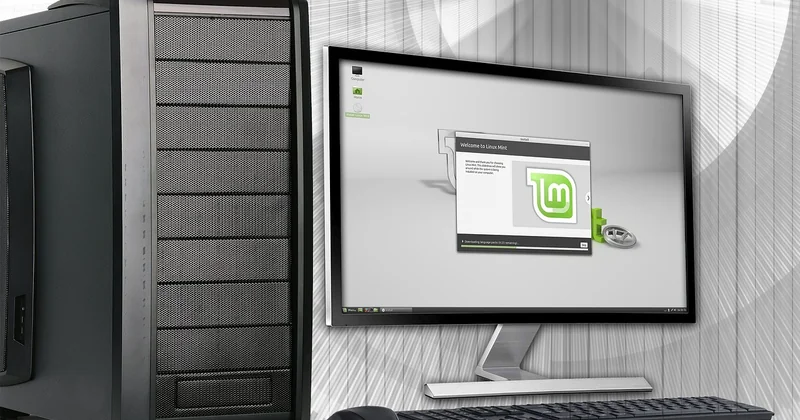
Why: it uses an LTS base, ships Cinnamon by default, includes the codecs and drivers most people need on day one, and its update manager is deliberately conservative — it labels updates by risk so you're not guessing. The community documentation is written for people who have never opened a terminal.
Ubuntu is the other obvious answer, and it's a fine one. Bigger community, more third-party tutorials, more applications that officially target it. The catch is that its default desktop is opinionated and some users find it constraining.
Zorin OS deserves a mention for a specific case: people who want their desktop to look and behave almost exactly like Windows. The layout presets are genuinely well done, and I've seen non-technical users settle into it within an hour. It's a smaller project, though, and that has real consequences for long-term support.
What is the best easy Linux distro for beginners?
"Easy" usually means "fewest decisions required during and after installation." By that measure, Linux Mint and Zorin OS are the two that require the least thinking. Ubuntu follows closely, then Fedora's workstation edition for people with slightly newer hardware who want current software.
Avoid for a first install: anything requiring manual partitioning as part of the standard path, anything without a graphical installer, and — this is important — anything whose entire appeal is "minimal." Minimal distributions are wonderful once you know what you're doing. They are a debugging exercise before that.
How to decide which distro to use
Run this sequence. It takes ten minutes and it beats reading another list.
- Write down your three main tasks. Documents and browsing? Development? Gaming? Audio production? Each points somewhere different.
- Check your RAM and Wi-Fi chip. Under 4 GB, go lightweight. Unusual Wi-Fi adapter, verify driver support first.
- Choose LTS. Unless you have a specific reason not to.
- Pick a desktop that matches your muscle memory. Windows background: Cinnamon or Zorin. Mac background: GNOME.
- Test on a live USB. Boot from it without touching your disk. Check Wi-Fi, sound, screen resolution, and whether sleep works.
- Install alongside your existing system if you're nervous, then migrate at your own pace.
That last step is worth dwelling on. Dual-booting is the lowest-risk way to try Linux on real hardware. The risk isn't Linux — it's the partitioning step, and specifically the moment where you're asked to choose a disk. Back up your files first. I mean it. I've helped two people recover data after that exact screen, and both times it was avoidable.
Does your distro choice matter for gaming?
Less than it used to, more than people claim. What matters: current graphics drivers, a recent kernel, and Steam's compatibility layer working properly. Distributions that ship newer kernels and easy access to proprietary GPU drivers will save you time. A conservative LTS can work well, but you may need to pull in a newer kernel manually.
If gaming is your primary use case, that's the one scenario where I'd steer you away from the most conservative option and toward something with more current packages.
How do I know which Linux distribution I use?
You inherited a machine, or you installed something months ago and forgot. Two commands settle it.
cat /etc/os-releaseThat prints the distribution name, version, and a few identifiers. On virtually every modern system it works, and it's the one I reach for first.
If you want a second opinion:
lsb_release -aAnd for the kernel and architecture alongside the OS name:
hostnamectlAny of those three will tell you what you're running. The desktop environment is a separate matter — check your system settings' "About" panel, or run echo $XDG_CURRENT_DESKTOP.
Test before you commit — the step everyone skips
A live USB session is the single highest-value thing you can do. You write an image to a USB stick, boot from it, and run the entire system from memory without installing anything. Twenty minutes of checking tells you more than twenty articles.
What to verify while you're there:
- Wi-Fi connects and stays connected
- Sound plays through the speakers
- Screen brightness controls respond
- Suspend and resume work
- Your printer or scanner is detected, if you use one
I once skipped this and discovered after installation that the laptop's touchpad needed a kernel parameter to work at all. Fixable, but irritating. The live session would have told me in thirty seconds.
One last thing, and it's the part I wish someone had told me: the distribution you pick matters far less than the community behind it. A slightly imperfect distro with an active forum and clear documentation will serve you better than a perfect-sounding one where your questions go unanswered. Check whether the project published release notes recently, whether the forum has activity this week, and whether the documentation assumes you already know the answer.
Pick one, install it, and stop optimizing. The best Linux distribution for a beginner is the one you're still using in six months — and you'll only find that out by booting it.